Tesla Entertainment Apps That Will Keep You Entertained
Tesla entertainment apps transform your car into a rolling theater, music studio, and gaming console. From Netflix and YouTube to Spotify and Apple Music, the Tesla infotainment system offers a wide range of apps that keep drivers and passengers entertained on long road trips and during charging stops. Whether you own a Model 3, Model S, or Model X, these apps bring endless fun right to your touchscreen.
Tesla entertainment apps have changed the way people think about life on the road. What used to be a simple driving machine now doubles as a personal entertainment hub. Whether you are stuck in traffic, taking a long road trip, or waiting at a Supercharger station, your Tesla touchscreen can keep everyone happy.
The Tesla infotainment system has come a long way since the first Model S rolled out. Today, it supports a wide variety of apps for streaming, music, games, and more. In this guide, we will walk you through the best Tesla entertainment apps, how to use them, and tips to get the most out of your setup.
Tesla entertainment apps are not just a luxury. They are a practical way to make every drive more enjoyable. Let us dive into the full lineup.
Key Takeaways
- Streaming apps like Netflix, YouTube, and Disney+ turn your Tesla into a mobile theater.
- Music apps including Spotify, Apple Music, and Amazon Music give you endless audio options.
- Tesla gaming apps like Chess, Beach Buggy Racing, and Solitaire keep passengers engaged.
- You can install new apps through the Tesla App Store or use the built-in web browser.
- Entertainment features work best while parked or charging for safety.
- Setting up a Tesla entertainment center is quick and easy with just a few taps.
- Regular software updates add new apps and improve existing ones.
📑 Table of Contents
Why Tesla Entertainment Apps Matter
Long drives can feel tiring, especially on highway trips that last hours. Having a good set of Tesla media apps makes a huge difference. Kids in the back seat can watch their favorite shows. Adults can catch up on podcasts or listen to new music. Everyone stays happy, and the journey feels shorter.
Beyond just fun, Tesla entertainment apps also serve a practical purpose. When you are charging at a Supercharger, those 20 to 40 minutes can feel like an eternity without something to do. With the right apps loaded up, you can turn dead time into productive or enjoyable time. You might watch an episode of a show, finish a crossword puzzle, or just relax with some music.
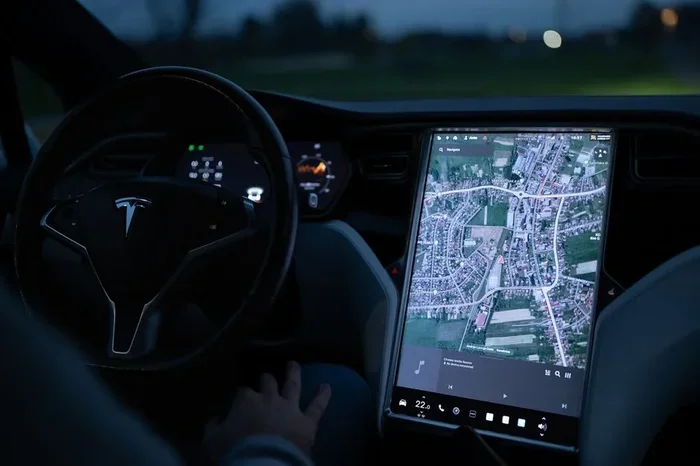
Tesla has built its entertainment system to be simple and intuitive. The large center touchscreen makes navigating apps easy. You do not need a phone or extra devices. Everything runs directly on the car’s system. This seamless integration is one of the reasons Tesla stands out from other electric vehicles.
Built-In vs. Downloaded Apps
Tesla comes with several built-in apps right out of the box. These include Spotify, YouTube, Netflix, and a few others. You can also access the Tesla App Store to download additional apps. Some apps require a Wi-Fi connection, which means they work best while the car is parked or plugged in.
The built-in apps are already optimized for the Tesla display. They look great and run smoothly. Downloaded apps from the App Store may vary in quality, but many are free and work surprisingly well on the Tesla hardware.
Top Streaming Apps for Your Tesla
When it comes to streaming apps for Tesla, the options are fantastic. Tesla has partnered with major streaming services to bring you a full entertainment experience on the road. Here are the top streaming apps every Tesla owner should know about.
Visual guide about Tesla car entertainment screen
Image source: images.pexels.com
Netflix on Tesla
Netflix is one of the most popular Tesla entertainment apps available. You can log in with your existing Netflix account and start watching right away. The large touchscreen makes viewing comfortable, and the picture quality is sharp. Netflix works while the car is parked, so it is perfect for charging breaks or lazy afternoons.
One thing to keep in mind is that you need to be parked to use Netflix. Tesla locks streaming apps when the car is in motion for safety reasons. This is a standard feature across all streaming apps on the Tesla platform.
YouTube and YouTube Kids
YouTube is another must-have app for Tesla owners. The Tesla YouTube app gives you access to the entire YouTube library. You can watch music videos, tutorials, vlogs, and more. YouTube Kids is also available, which is great for families traveling with young children.
The YouTube app on Tesla supports both Wi-Fi and, in some cases, LTE connectivity. This means you can stream even when you are not at a charging station. Just make sure you have an active data plan if you want to use it on the go.
Disney+ and Other Streaming Services
Disney+ has become a favorite among Tesla owners. The app offers a huge library of Disney, Pixar, Marvel, and Star Wars content. It works beautifully on the Tesla screen and is a great way to keep kids entertained on long trips.
Other streaming services like Apple TV+ and Hulu also work on Tesla vehicles. The availability of apps may vary depending on your Tesla model and software version. Tesla regularly updates its system to add new streaming options.
| Streaming App | Free with Tesla | Requires Account | Works While Parked |
|---|---|---|---|
| Netflix | No (subscription needed) | Yes | Yes |
| YouTube | Free (ads supported) | Optional | Yes |
| Disney+ | No (subscription needed) | Yes | Yes |
| Apple TV+ | No (subscription needed) | Yes | Yes |
| Hulu | No (subscription needed) | Yes | Yes |
Tesla Music and Audio Entertainment
Music is at the heart of the Tesla entertainment experience. The car supports a range of music streaming services that make it easy to enjoy your favorite tunes during any drive. Let us look at the best Tesla music streaming options available.
Spotify on Tesla
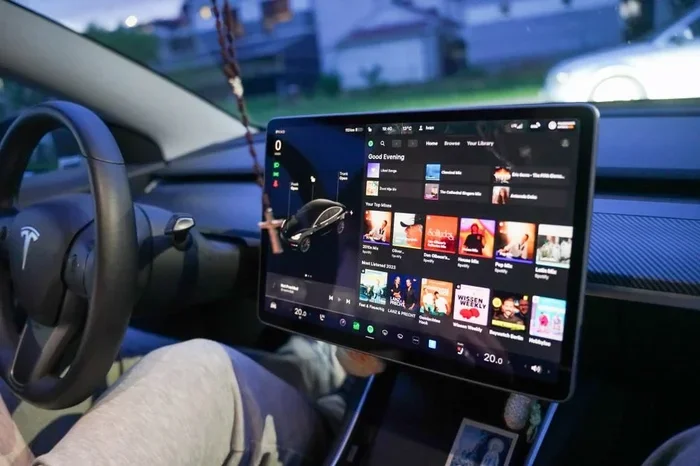
Spotify is one of the most widely used music apps in the world, and it works seamlessly on Tesla. You can link your Spotify account and access millions of songs, playlists, and podcasts. The Tesla interface makes it easy to browse by genre, mood, or artist.
Spotify supports both free and premium tiers. The free version includes ads, while Spotify Premium gives you an ad-free experience. Many Tesla owners prefer Premium for the uninterrupted listening experience during long drives.
Apple Music and Amazon Music
Apple Music integrates beautifully with Tesla vehicles. If you already subscribe to Apple Music, you can sign in and start streaming right away. The app offers high-quality audio and personalized playlists. It is a great choice for iPhone users who already live in the Apple ecosystem.
Amazon Music is also supported on Tesla. Whether you use the free tier or Amazon Music Unlimited, you get access to a vast music library. Both apps work well with the Tesla sound system, which delivers surprisingly rich audio for a car.
Podcast Apps and Radio
Podcasts have exploded in popularity, and Tesla owners can enjoy them too. Apps like Pocket Casts, Overcast, and Apple Podcasts work on the Tesla platform. You can download episodes over Wi-Fi and listen during your drive without needing a data connection.
For traditional radio lovers, Tesla supports TuneIn and iHeartRadio. These apps give you access to thousands of live radio stations from around the world. It is a great way to discover new music or catch up on news and sports while on the road.
Bluetooth Audio Streaming
Not all audio apps are available on the Tesla system. But that does not mean you are limited. You can pair your phone via Bluetooth and stream audio from any app on your phone through the Tesla speakers. This works with apps like Audible, Google Podcasts, or any music app you prefer.
Bluetooth audio quality on Tesla is solid. It may not match a direct streaming app, but for most listeners, the difference is minimal. This is a handy fallback option if your favorite app does not have a native Tesla version.
Gaming Apps for Tesla Owners
Tesla is not just about music and videos. The entertainment system also supports a growing collection of games. Tesla gaming apps have become a fun way to pass the time, especially during long charging sessions or road trip stops.
Built-In Games
Tesla comes with several games already installed. These include Chess, Solitaire, Beach Buggy Racing, and Super Breakout. They are simple but surprisingly fun, and they do not require any internet connection to play.
Chess is a standout among the built-in games. It offers a clean interface and decent AI opponents. Solitaire is perfect for quick breaks. Beach Buggy Racing is a kart racing game that looks great on the Tesla display and provides genuine entertainment value.
Downloading More Games
You can expand your game library by visiting the Tesla App Store. The store offers a selection of casual and arcade-style games. Some popular titles include Angry Birds, Asphalt 8, and various puzzle games.
Most Tesla games are designed to be simple and easy to pick up. They work well with the touchscreen controls. While the gaming experience is not as immersive as a dedicated gaming console, it is more than enough to keep passengers entertained during a charging break.
Fun Features Beyond Games
Tesla also includes some fun non-game features. The “Camp Mode” lets you use the entertainment system while the car is off, perfect for outdoor trips. “Theater Mode” dims the screens and turns the Tesla into a private cinema for movie watching. These features show how Tesla thinks about entertainment as a complete experience, not just a collection of apps.
How to Get More Apps on Your Tesla
If you find that your Tesla does not have a specific app you want, there are ways to add it. Getting more Tesla media apps on your car is straightforward and does not require any technical skills.
Using the Tesla App Store
The Tesla App Store is built right into the car’s system. To access it, tap the App icon on the home screen. You will see categories for Games, Media, and Lifestyle. Browse through the available apps and tap Install to download them directly to your car.
Some apps are free, while others may require a purchase or subscription. The App Store updates regularly, so new apps appear over time. Make sure your Tesla software is up to date to access the latest offerings.
Using the Tesla Web Browser
Tesla includes a built-in web browser that you can use to access websites directly. While it is not as full-featured as a desktop browser, it works well for streaming content from sites that do not have native Tesla apps.
You can visit streaming websites like Twitch or free movie sites through the browser. The experience is not as smooth as a native app, but it gets the job done when you need it. Keep in mind that browser use works best on Wi-Fi, not LTE.
Third-Party App Installation
Advanced users sometimes explore ways to install third-party apps on Tesla. This can include sideloading apps or using workarounds to access apps not officially supported. However, this approach comes with risks, including voiding your warranty or causing system instability.
For most Tesla owners, sticking to the official App Store and built-in apps is the safest and most reliable approach. Tesla’s software updates regularly add new native apps, reducing the need for workarounds over time.
Tips for Using Tesla Entertainment Apps
Getting the most out of your Tesla entertainment setup is easier than you think. Here are some practical tips to enhance your experience.
Use Wi-Fi When Possible
Streaming apps use a lot of data. If you have a limited data plan, connect to Wi-Fi whenever possible. Supercharger stations and Tesla destinations usually offer free Wi-Fi. Use these connections to download content or stream without using your mobile data.
Download Content Ahead of Time
Many streaming apps allow you to download content for offline viewing. Download movies and shows over Wi-Fi before a trip, and you can watch them even in areas with poor connectivity. This is especially useful for long drives through rural areas or mountains.
Keep Your Software Updated
Tesla releases software updates regularly. These updates often include new apps, bug fixes, and performance improvements. Make sure your car is connected to Wi-Fi and set to receive automatic updates. Staying current ensures you always have access to the latest entertainment options.
Set Up Individual Profiles
If multiple people use the same Tesla, consider setting up individual profiles for streaming services. This way, each person can access their own watch history, recommendations, and preferences. It is a small touch that makes a big difference for family road trips.
Use Headphones for Quieter Listening
If you are parked and watching a movie or playing a game, use headphones to keep the noise down. This is especially important in campsites, parking lots, or when other people are nearby. Tesla supports Bluetooth headphones, making it easy to connect and enjoy private audio.
Explore Tesla Theater Mode
Theater Mode is a built-in feature that transforms your Tesla into a personal cinema. It dims all screens and plays content on the main display. Combined with Netflix or Disney+, Theater Mode creates an immersive viewing experience that feels like a real home theater.
Common Mistakes to Avoid
While using Tesla entertainment apps is generally smooth, there are a few common mistakes that can cause frustration. Avoiding these will help you get the best experience.
One mistake is trying to use streaming apps while driving. Tesla disables these features when the car is in motion. This is a safety feature, and attempting to bypass it is both dangerous and against the law in most places. Always use entertainment apps when the car is parked.
Another mistake is not managing your data usage. Streaming video uses a lot of mobile data. If you rely on LTE for streaming, keep an eye on your data plan to avoid unexpected charges. Use Wi-Fi for heavy streaming whenever possible.
Some owners forget to log out of shared accounts. If you use a family Netflix or Spotify account, make sure you log out when someone else is using the car. This prevents confusion and ensures everyone gets their personalized experience.
Finally, do not ignore software updates. Outdated software can cause apps to run slowly or crash. Keeping your Tesla updated ensures smooth performance across all entertainment features.
Final Thoughts
Tesla entertainment apps are a game-changer for electric vehicle owners. They turn your car into a versatile entertainment center that keeps everyone happy during drives, charging stops, and road trips. From streaming movies and TV shows to listening to music and playing games, the options are plentiful and easy to use.
The best part is that Tesla continues to improve its entertainment system with every software update. New apps are added regularly, and existing apps get better over time. This means your Tesla entertainment setup will only improve the longer you own the car.
Whether you are a casual listener or a binge-watching enthusiast, there is something for everyone in the Tesla entertainment ecosystem. Take the time to explore the available apps, set up your preferences, and enjoy the ride. With the right Tesla entertainment apps, every journey becomes an experience.
Start exploring today. Load up your favorite streaming services, queue up a playlist, and discover the full potential of your Tesla’s entertainment system. You will wonder how you ever traveled without it.
Frequently Asked Questions
Can I use Netflix on Tesla while driving?
No, Netflix and all other streaming apps on Tesla are disabled while the car is in motion. This is a safety feature built into the Tesla system. You can enjoy Netflix only when the vehicle is parked or in Park mode.
Do Tesla entertainment apps require an internet connection?
Most streaming and media apps need Wi-Fi or LTE to work. However, some built-in games and downloaded content can be used offline. Connecting to Wi-Fi at Supercharger stations is the best way to access apps without using mobile data.
Can I install apps that are not in the Tesla App Store?
Officially, you can only install apps from the Tesla App Store. Some advanced users explore third-party installation methods, but these come with risks. Sticking to the official store ensures stability and keeps your warranty intact.
Are Tesla entertainment apps free?
The Tesla apps themselves are free to download. However, most streaming services like Netflix, Disney+, and Spotify require a paid subscription. Some apps like YouTube offer free ad-supported content, while others require a premium plan.
Which Tesla models support the most entertainment apps?
All modern Tesla models, including Model 3, Model Y, Model S, and Model X, support the full range of entertainment apps. Newer models with hardware version 3 or higher tend to have the best performance and app compatibility.
How often does Tesla add new entertainment apps?
Tesla regularly updates its software, which often includes new apps and features. Major updates typically come every few months. Keeping your car connected to Wi-Fi and enabling automatic updates ensures you never miss a new addition.
=== CONCLUSION ===
Tesla entertainment apps bring a level of convenience and fun that sets Tesla apart from other vehicles on the road. With streaming services, music platforms, games, and more, your Tesla becomes much more than a way to get from point A to point B. It becomes a mobile entertainment center that everyone can enjoy.
Take advantage of the tips and app recommendations in this guide to build the perfect entertainment setup for your Tesla. Whether you are commuting to work or driving across the country, the right apps make every minute better. Explore your options, try new apps, and make the most of your Tesla experience today.